Primarily from seat-based subscriptions on paid tiers. Upsells are likely driven by usage needs, advanced features, and potentially custom enterprise deals.
What exactly are customers paying for?
SproutsAI isn’t just another tool with a feature checklist. What users are really paying for are outcomes—real business results, not just usage credits or toggles in a UI.
Here’s what they’re getting:
• Efficiency Gains
Automating tasks and consolidating workflows that were previously spread across multiple platforms = serious time saved.
• Smarter Decisions
Users rely on SproutsAI’s intelligence and analytics to make better, data-backed choices—faster and with more confidence.
• Performance Boosts
Whether it’s generating more leads, sourcing better candidates, optimizing marketing spend, or unlocking hidden insights, SproutsAI helps teams hit their goals more effectively.
• Access to Unique Capabilities
Proprietary AI models and data pipelines give users a competitive edge they can’t get elsewhere.
• All-in-One Convenience
It’s not just intelligence—it’s insights plus workflow execution, unified in one platform.
• Room to Scale
As teams grow, SproutsAI grows with them. No need to outgrow your tooling every 6 months.
How Does SproutsAI Stand Out?
SproutsAI’s real advantage isn’t just any one feature—it’s the way everything works together.
• Intelligence Meets Action
Most tools stop at insights or data dumps. SproutsAI goes a step further—embedding insights directly into workflows, enabling faster execution and real outcomes.
• Proprietary Advantage
Unique models, custom-trained AI, and exclusive data structures give users access to things competitors simply can’t replicate.
• Laser Focused Value
Unlike bloated enterprise platforms or disconnected point solutions, SproutsAI is purpose-built for solving high-impact problems in specific roles and industries (starting with SMBs and Mid-Market teams).
• Power Without the Bloat
Users get advanced functionality without needing a PhD in software. It’s powerful, but still usable.
How Should SproutsAI Be Positioned?
SproutsAI is more than a data tool or automation platform. It should be positioned as the Intelligent Action Platform for modern, outcome-driven teams.
• Who it’s for:
GTM teams, growth marketers, recruiters, and other high-leverage roles in SMB and Mid-Market orgs.
• Core Message:
Turn insights into action—in one place. Save time. Make better decisions. Get better results.
• Market Placement:
SproutsAI sits at the intersection of sales intelligence, workflow automation, and productivity tools. It delivers more value than fragmented point tools and is more agile and accessible than bloated enterprise suites.
• Pricing Perception:
It offers premium outcomes at a mid-market-friendly price. Clear tiers and add-ons make it easy to scale up as teams grow and their needs get more complex.
Competitive Landscape
Here’s how SproutsAI stacks up against key players in the space:
Competitor | Pricing Model | Free/Trial? | Key Differentiator | Typical Price | Positioning Notes |
|---|---|---|---|---|---|
Competitor A (ZoomInfo-type) | Seat-based (High $) | Limited Trial via Sales | Data depth, niche focus | $15K+/year | Heavy enterprise focus, strong price anchor |
Competitor B (Clay-type) | Usage-based | Free tier w/ credits | Workflow orchestration | ~$150+ | Geared toward technical/GTM ops |
Competitor C (Lusha-type) | Seat + Credits | Free tier + paid | Easy UX, strong contact data | $30–$100+ | Mid-market sweet spot, direct competitor |
Competitor D (Clearbit-type) | Usage + Platform fee | Sales-led only | Real-time data, high accuracy | High (custom) | Targeted at B2B marketers |
Competitor E (Cognism-type) | High-seat pricing | Sales-only | Compliance guarantees, regional strength | $10K+/year | Enterprise vertical focus |
Competitor F (Instantly-type) | Seat + Usage | Low-cost entry | High-volume cold outreach | $37–$100+ | Task-specific, narrow focus |
Competitor G (Hunter-type) | Usage-based | Free tier + paid | Simple and specific tool | $50–$400+ | Less comprehensive than SproutsAI |
SproutsAI | Seat + Credits | Free tier, Paid Tiers | Unified data + automation | $50–$100+ | Strong value in blending insight + execution |
Segmenting by Usage Patterns (RFM)
Let’s break down the types of users we see:
• High Recency, High Frequency (Champions / Power Users):
They’re active, they use SproutsAI often, and they rely on it to get work done. These are our most valuable users.
• High Recency, Low Frequency (Occasional Specialists):
They’ve used SproutsAI recently but not often. Usually, they log in to complete specific high-impact tasks—think project-based usage.
• Low Recency, High Frequency (Potential Churn / Role Change):
These users used to be active but have dropped off. They may have changed roles or lost the need—time for re-engagement.
• Low Recency, Low Frequency (Explorers / Free Loaders):
Barely engaged. These users haven’t found value yet, or they’ve forgotten about the product entirely.
Mapping Users to Pricing Tiers
Now let’s connect those segments to the pricing structure:
• Free Tier:
Targets Explorers (Low R / Low F). It’s an on-ramp—designed to let users taste value and push them toward upgrading once they engage more deeply.
• Starter Tier ($49–$69/user/mo):
Good for solo users or tiny teams who are active (High R), but not yet power users. Also fits price-sensitive specialists who need more than what the Free plan offers—just not every day.
• Professional Tier ($99–$129/user/mo):
Built for High R / High F users in SMBs and mid-market teams. They rely on SproutsAI daily—for analysis, automation, and collaboration. This is your “Most Popular” plan.
• Business Tier ($179–$249/user/mo):
Targets large teams or more advanced users who need deeper features—like complex automations, advanced analytics, or API access. It also works for occasional specialists who depend on specific premium tools.
• Enterprise Tier (Custom Pricing):
Designed for big orgs with varied user patterns. Their needs are less about individual usage and more about scale, compliance, integrations, and support.
Premium Plans for Power Users
Your most frequent users—the Champions—are prime candidates for premium upgrades. Their workflow depends on SproutsAI, and they’re often the first to hit usage or feature limits.
That’s where the Business Tier shines—it gives them more seats, more power, and better controls. But it doesn’t stop there. Some power users will outgrow even this.
That’s where Add-ons come in:
• Advanced AI Suite
• Premium Data Packs
• Unlimited Usage bundles
These let you monetize top-tier users without bloating the core Business plan for everyone else.
Use Feedback to Keep Pricing Aligned
Pricing is never “set and forget.” To stay relevant and competitive, keep a feedback loop running.
How to collect feedback:
• In-App Surveys: After a user finishes a task, ask something like: “How valuable was this feature for achieving your goal? (1–5)”
• Segmented Surveys: Send emails tailored to each RFM segment—ask power users about pain points, or specialists about feature importance.
• Van Westendorp Analysis: Use pricing sensitivity surveys to test willingness to pay for new or existing features.
• Post-Trial Feedback: Ask users why they did (or didn’t) upgrade.
• User Interviews: Talk to users from different tiers to learn how they think about ROI and what makes them feel SproutsAI is worth it.
How to use this feedback:
• Identify underpriced features that users love
• Adjust credit caps or unlocks based on pain points
• Test pricing for new features before launch
• Refine the pricing page to better speak the user’s language
Smart Trial Offers by Segment
Trials are most effective when they’re targeted, actionable, and clearly tied to value.
1. For High R / High F Users (Power Users)
• Trial Offer: “Try Unlimited Automation for 7 days” or “Get full access to Advanced Analytics”
• Why it works: These users already rely on SproutsAI. Removing friction or adding speed improves their ROI and justifies the upgrade.
2. For High R / Low F Users (Occasional Specialists)
• Trial Offer: “Activate [Premium Integration] for 14 days” or “Try Advanced AI for your quarterly report”
• Why it works: These users don’t need constant access—but unlocking the right feature at the right time helps them complete a high-stakes task.
3. For Users Hitting Limits
• Triggered Offer: “You’ve hit your usage cap—try Pro with 5x credits for 7 days”
• Why it works: The pain is immediate and the value of upgrading is clear.
Here’s a rewritten version of the “When to charge?” section, keeping the depth and strategic thinking intact while making it sound more like a clear, human explanation—like something a product or growth lead would present to their team:
The “Aha!” Moment
This is the first time a user truly gets SproutsAI. It’s that “oh wow, this actually works” realization—when the product goes from being a tool to being the solution.
Examples of when this might happen:
• They run their first analysis and uncover a hidden insight that feels useful and real.
• They set up an integration (like a CRM or data source), and see live, relevant data flowing in.
• They automate a task they used to do manually—and it just works.
This is where perceived value flips from theoretical to tangible. Until this point, users are still in exploration mode. After this, they see the potential.
“Happy Moments”
These aren’t just one-time breakthroughs—they’re recurring wins. Think of them as proof that SproutsAI keeps delivering value over time.
A few examples:
• A user tracks a KPI improvement that clearly ties back to SproutsAI.
• They share a report or insight with their team and get positive feedback.
• They save serious time on a weekly task thanks to automation.
• They uncover a high-value lead or trend they wouldn’t have seen otherwise.
Every Happy Moment nudges the user to think: “This tool is helping me win.”
How Do We Identify These Moments?
They don’t always happen at the same time for everyone, but we can spot them through:
• Behavioral Analytics: What sequence of actions reliably leads to activation and retention?
• Surveys & Interviews: Ask directly: “When did SproutsAI start to click for you?”
• Activation Data: How many users complete a defined set of onboarding actions tied to value realization?
So, When Do We Charge?
Monetization should happen after users have experienced the core value—but timed to align with moments when they’re already engaged and seeing results.
Best Moments to Prompt an Upgrade:
• Just after the “Aha!” moment
Let users feel the win. Don’t gate it. But once they’ve had the first success, that’s the time to introduce limits or upgrade nudges.
• During a Happy Moment
Example: They hit a limit while building a time-saving automation. They’re already winning—make it easy to continue.
• When Usage Caps Are Hit
If someone runs out of credits or hits a feature wall after understanding the value, they’re much more likely to convert.
• Feature Gating Moments
Clicking a locked feature is a strong intent signal—especially if it’s tied to known Happy Moments.
• Team Expansion Attempts
Trying to add teammates often happens once the user sees value. This is a natural time to suggest a paid tier.
• Value Milestones
Example: “You’ve saved 8 hours using SproutsAI this week. Upgrade to Pro to unlock more time-saving features.”
Visualizing the Strategy: Value vs. Price
Imagine a graph:
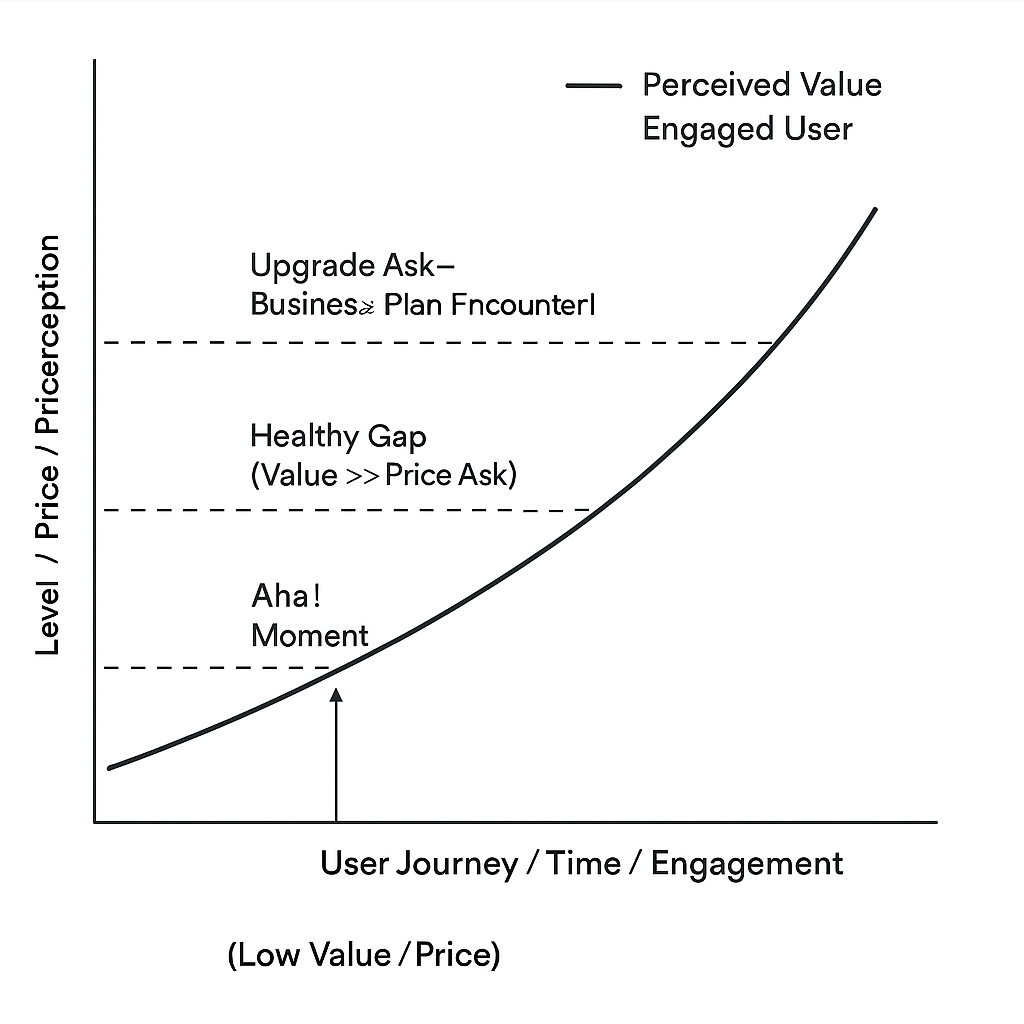
• Y-axis: Perceived Value
• X-axis: User Journey / Time
The Perceived Value curve starts low during onboarding, spikes at the “Aha!” moment, then climbs steadily as the user experiences more Happy Moments and deeper integration into their workflow.
Now overlay Perceived Price Points—moments when the user is shown an upgrade option, pricing page, or feature wall.
Your goal? Ensure every monetization moment lands after value has been clearly demonstrated. The larger the gap between value and price, the easier the user justifies paying. The smaller the gap, the higher the friction—and the lower your conversion.
Trial Strategy: Go Hybrid
The best approach is a hybrid model:
• Free Plan with Usage Caps: Give users room to reach the “Aha!” moment without friction.
• Contextual Trials: Let users try premium features right when they need them. For example, if they click a gated AI feature tied to a Happy Moment, let them experience a 7-day trial.
• Paid Plans: Unlock more credits, deeper integrations, and broader access for users who’ve clearly seen value.
Smart Upgrade Prompts
In-app prompts should be behavior-based and value-driven. Talk to the outcome, not just the feature.
Example:
“Want to automate this process end-to-end? Unlock [Feature] and save even more time. Try it free for 7 days.”
What Are Customers Really Paying For?
At its core, SproutsAI delivers Actionable Intelligence and Automated Workflows that help users get real business results. That might mean saving time through automation, making better decisions with sharper insights, tapping into exclusive AI capabilities, or streamlining operations through an all-in-one platform.
In short: users pay to get where they’re going—faster and smarter. Whether it’s finding better leads, optimizing campaigns, sourcing talent, or spotting market trends, SproutsAI helps them do it more efficiently.
What Are We Charging For?
To price fairly and scale effectively, we need to understand how to meter this core value. Here’s how the “currency” of the product breaks down:
• Seats:
This is the baseline. A seat gives someone access to the platform—perfect for teams that need collaboration and shared visibility.
• Usage Credits:
These reflect how intensely someone is using the product. Credits get consumed through actions that deliver value—running analyses, generating reports, triggering workflows, processing records, or using AI-powered tasks.
• Feature Access:
Some features provide disproportionate value—think advanced automation, high-end integrations, or specialized AI tools. Gating these by tier (or as add-ons) helps align price with utility.
Together, these three components—Seats, Usage Credits, and Feature Access—become the pricing levers. Higher usage and more powerful tools typically mean the user is getting more value, so it makes sense for pricing to scale accordingly.
In some cases, we might introduce additional currencies like API call limits or dedicated AI compute units for enterprise-level use cases.
What Drives Value in SproutsAI?
Let’s break down the core elements that deliver value to users. These are the levers we price around:
• Data & Intelligence Outputs
• Usage of core actions (tracked through Credits)
• Automation (Basic and Advanced)
• Depth and quality of integrations
• AI Capabilities (specific models, features)
• Data enrichment and analysis (standard to advanced)
• Advanced filters and segmentation
• Analytics and reporting tools
• Collaboration features for teams
• API access for deeper customization
These aren’t just features—they’re real enablers of business performance. That’s what we’re packaging and selling.
Gating Strategy: What’s Free, What’s Paid, and What’s Premium?
A thoughtful gating strategy helps users discover value quickly, but encourages them to upgrade when they’re ready for more.
What stays free:
• A limited number of Usage Credits per month (enough to showcase the core loop)
• Access to the core “aha!” moment—where users feel the value
• A capped number of projects or automations
• Basic integrations
What gets gated in the Starter / Pro / Business tiers:
• More Usage Credits (tiered by plan)
• Access to complex automation tools
• More powerful integrations (and more of them)
• Core AI functionality (can be credit-based or tiered)
• Advanced filtering and reporting tools
• Team collaboration features, including seat-based permissions
• Standard analytics dashboards
What’s reserved for Add-ons or Higher Tiers (e.g., Business/Enterprise):
• Premium Credit Packs – for teams that use a lot
• Advanced AI Suite – high-end features or models, possibly tied to a new currency
• Premium Data Pack – access to proprietary data sources
• Advanced Analytics & Reporting – next-level insights
• Premium Integrations Pack – niche or high-value connectors
• Advanced API Access – expanded call limits and developer tooling
• Dedicated Support / Customer Success Manager – tied to Enterprise deals
• Compliance & Security Package – for larger orgs with enterprise-level needs
The proposed direction is a 4-tier hybrid model—mixing seat-based pricing with usage and feature-based add-ons. This gives us the flexibility to cover a wide range of teams, from solo users to large enterprises.
The Tiered Plan
• Free
Ideal for onboarding. Helps with user acquisition and lets new users explore core value with limited access.
• Starter ($49–$69/user/month)
Great for individuals or small teams looking to get started with sales automation.
• Professional ($99–$129/user/month)
The go-to plan for SMBs and mid-market teams. Packs solid value. (This is the tier we’d likely push as “Most Popular.”)
• Business ($179–$249/user/month)
Designed for larger teams that need more control, automation, and collaboration tools.
• Enterprise (Custom pricing)
A fully tailored offering with custom seats, usage, features, and premium support.
The key here is to validate each tier with real engagement analytics—track how teams use the product, and adjust features and pricing based on what actually drives value.
Strategy Variants to Maximize Revenue
While the hybrid model above offers a balanced starting point, SproutsAI’s pricing can go in different directions based on what we’re optimizing for—whether that’s user growth, higher ARPU, or deeper enterprise adoption. Here are three different paths we can explore:
Option 1: Optimized Hybrid (Balanced Growth + Revenue)
This approach sticks to the hybrid model, blending predictability (seat-based) with flexibility (usage/features). It scales smoothly and works well if we want a little bit of everything—volume, revenue, and control.
Structure:
• Free: Basic usage and value discovery.
• Starter ($59/user/month): 1 seat, 500 usage credits/month, basic automation + reporting.
• Professional ($119/user/month): 3 seats included, 2,500 credits, core integrations, advanced automation.
• Business ($199/user/month): 5 seats, 10,000 credits, premium integrations, API access, team collaboration tools.
• Enterprise: Starts at ~$15K ACV. Includes everything + security/compliance features.
Add-ons:
• Advanced AI Suite: +$39/user/month
• Premium Data Pack: Usage or flat fee
• High Volume API Access: Tiered pricing
Why it works:
Clear upgrade paths, a solid free plan to attract leads, and add-ons to drive ARPU from power users. Predictable revenue from seat licenses helps build a reliable base.
Option 2: Usage-Driven Tiers (High ARPU for Power Users)
This one ties pricing directly to how much value users actually get from the product—measured in SproutsAI Units (actions, workflows, AI tasks). Lower base pricing encourages adoption; revenue comes from high usage.
Structure:
• Free: Limited usage units per month.
• Growth ($149/month base for 5 seats, +$19/extra): 10,000 usage units, core features.
• Scale ($499/month base for 10 seats): 50,000 usage units, advanced features.
• Performance ($999/month base for 15 seats): 150,000 usage units, full access to all features.
• Enterprise: Custom seats + usage volume, lower per-unit pricing.
Overages: Clearly defined (e.g., $10 per 1,000 extra units).
Why it works:
It aligns revenue directly with product value. Great for maximizing returns from engaged teams. But it does mean MRR might fluctuate more, so we’ll need strong messaging to communicate what “Usage Units” really mean.
Option 3: Feature-Packed Tiers (Simplicity First)
If we want to reduce friction and avoid scaring people off with usage-based pricing, this model works by making usage generous—and tying upgrades to feature access instead.
Structure:
• Free: Core features, light usage.
• Core ($89/user/month): All essential features + a big usage allowance (enough for 80% of solo users).
• Collaborate ($169/user/month): Adds team tools, integrations, basic analytics.
• Advanced ($299/user/month): Everything included—premium AI, API, advanced analytics.
• Enterprise: Full support stack, SSO, compliance, and custom integrations.
Add-ons: Only for specialized needs (e.g., niche integrations or third-party data).
Why it works:
Simple, easy to understand, and reduces stress over usage caps. But we’ll need strong differentiation between features at each level or users won’t feel the need to upgrade.
Choosing the Right Model
No one model is perfect. Each has trade-offs:
• Hybrid: Good balance. Easy to test and adapt.
• Usage-Based: Best if there’s a clear value metric and usage varies widely.
• Feature-Based: Great for teams who don’t want surprises in pricing.
What’s most important is that SproutsAI stays flexible. Use analytics and user feedback to refine the model over time. What users are willing to pay—and what they think they’re paying for—should guide how we package the product.
How Users Discover Pricing Today
Most users likely come across SproutsAI pricing through a few key entry points:
• A dedicated “Pricing” link in the top navigation
• In-app prompts when they hit usage limits or try to access gated features
• CTAs on marketing pages tied to specific use cases or benefits
• Comparisons or reviews on external blogs or review sites
When they land on the pricing page, they’re not casually browsing. They’re here to make a decision—or at least understand what they’re getting into.
What they’re really asking:
• How much does this cost me—now and in the long run?
• What exactly do I get at each level?
• Which plan fits my needs best?
• Are there any hidden limits or surprise charges?
• Can I trust this product to deliver what it promises?
Why the Current Experience Likely Looks the Way It Does
SproutsAI probably follows a familiar SaaS format: column-based tier breakdowns, a few checkmarks, and a toggle for monthly vs. annual billing.
The logic behind that likely goes something like this:
• Keep it direct for high-intent users
• Stick to conventions to reduce decision friction
• Prompt upgrades when users hit pain points in the product
• Avoid overwhelming users with too much detail up front
It’s a solid start—but also a missed opportunity.
Simulating the Current Page (And Its Pitfalls)
What it likely looks like:
• 3–4 columns (Free, Basic, Pro, Enterprise)
• A vertical checklist of features with checkmarks
• A billing toggle
• CTA buttons like “Sign Up” or “Contact Sales”
What’s probably missing or unclear:
• The value of usage credits and how they work
• Clear differentiation between tiers—especially Basic vs. Pro
• Real guidance for different types of users
• Contextual CTAs that align with user behavior or needs
• Emotional triggers (outcomes) over technical features
• Add-on visibility and optional customization paths
• Trust-building answers to pricing anxiety or feature limitations
Redesigning SproutsAI’s Pricing Page: A Smarter, User-Centric Structure
To align pricing with how people actually make buying decisions—and how SproutsAI creates value—here’s a redesigned approach that prioritizes clarity, segmentation, and conversion.
1. Headline That Sells Outcomes, Not Features
“Unlock Actionable Intelligence. Pick the Plan That Fits Your Growth.”
Make the value obvious from the first line.
2. Segmentation Helper (Optional, but Highly Recommended)
At the top of the page, a simple toggle or question:
“What best describes you?”
• Individual / Small Team (1–5 users)
• Growing Business (6–50 users)
• Large Organization (50+ users)
The pricing layout adapts slightly to recommend a plan, reducing friction and guesswork.
3. Tier Layout: Clear, Focused, Value-Driven
• Free Plan – For exploration and light use
• Starter – Great for individuals or small teams getting serious
• Professional (Highlighted) – Most popular for core teams
• Business – Built for scaling orgs that need power + control
• Enterprise CTA – Off-page prompt to talk to sales
Each plan card should show:
• Plan name + who it’s for (e.g., “Built for small GTM teams automating their first workflows”)
• Price + clear billing frequency toggle
• Core features in bullet format: seats, usage credits, key unlocks
• Focused CTA: “Start Free Trial,” “Upgrade Now,” “Contact Sales”
4. Expandable Comparison Table (Below Plans)
Group features by function:
• Intelligence
• Automation
• Integrations
• Analytics & Reporting
• Collaboration
• Support
Use tooltips for anything not immediately clear (e.g., what usage credits are, what advanced analytics includes). Avoid clutter up top—let users drill down only if they want.
5. Add-Ons as a Clear Revenue Lever
Dedicated section below the pricing tiers:
Enhance Your Workflow with Add-Ons
Each add-on shown as a card:
• Advanced AI Suite (+$39/user/mo)
• Premium Data Pack (usage or fixed fee)
• High-Volume API Access (tiered pricing)
CTA: “Add to Plan” or “Learn More”
6. Comprehensive FAQ: Kill Objections Before They Kill Conversions
FAQs grouped into themes:
• General (“What’s the difference between plans?”)
• Billing (“What if I want to switch plans later?”)
• Credits (“How are credits consumed?”)
• AI & Data Accuracy (“How reliable are the insights?”)
• Security (“What compliance standards do you meet?”)
Proactively answer questions that build trust and reduce uncertainty.
7. Trust Signals Everywhere They Matter
• Rotating logos of recognizable customers
• Targeted testimonials by segment (e.g., “SproutsAI helped our SDR team cut manual work by 60%”)
• Review platform badges and ratings (G2, Capterra)
• Links to deep-dive case studies
8. Clear Access to Support
Sticky sidebar or footer element with:
• Chat support hours
• Link to help docs
• “Talk to Sales” CTA
Why This Redesign Works
• Outcome-Driven: Every section reminds users what they’ll achieve, not just what they’ll get.
• Segment-Aware: Helps different types of users feel seen and guided toward the right plan.
• Upgrade Friendly: Add-ons and tier clarity make it easier for users to scale as they grow.
• Objection-Proof: Tackles uncertainty with answers, proof, and personalized value framing.
• Aligned With Strategy: The structure fully supports our hybrid monetization approach—seats + usage credits + optional expansion.
Brand focused courses
Great brands aren't built on clicks. They're built on trust. Craft narratives that resonate, campaigns that stand out, and brands that last.
All courses
Master every lever of growth — from acquisition to retention, data to events. Pick a course, go deep, and apply it to your business right away.
Courses
Built by Leaders From Amazon, CRED, Zepto, Hindustan Unilever, Flipkart, paytm & more

Crack a new job or a promotion with ELEVATE
Designed for mid-senior & leadership roles across growth, product, marketing, strategy & business
Learning Resources
Browse 500+ case studies, articles & resources the learning resources that you won't find on the internet.
Patience—you’re about to be impressed.